What Is an LTO Tracker
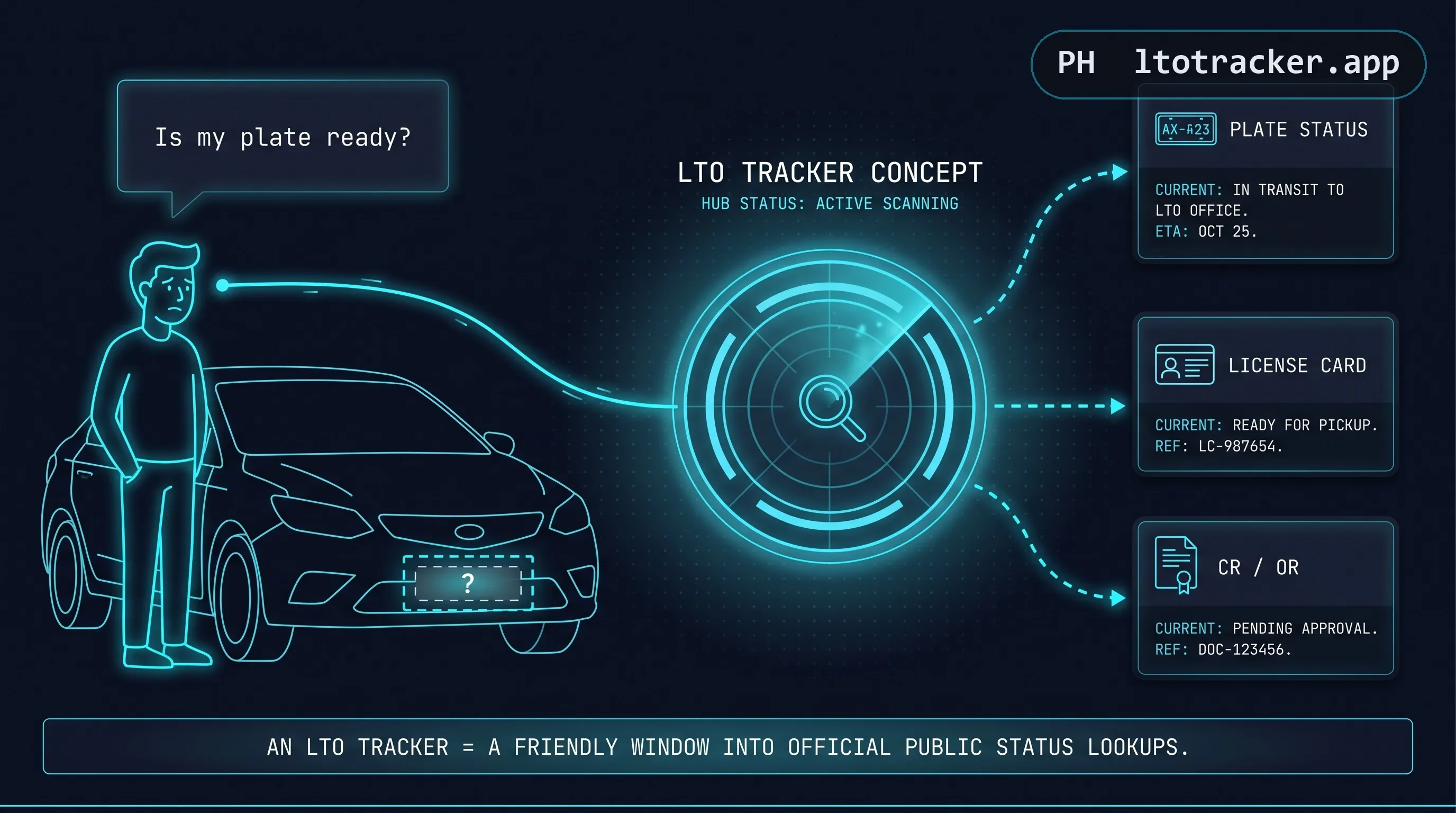
If you recently registered a brand-new car or motorcycle in the Philippines, you already know that you do not walk out of the dealership with your plate number attached. LTO produces plates and driver's license cards in centralized batches, and depending on the current backlog, the wait between registration and release can run from a few weeks to several months. During that waiting period, "LTO tracker" is what most people type into Google when they want a straight answer to one question: is my plate ready yet.
Strictly speaking, "LTO tracker" is not an official government product name — it is the generic search term people type in. What actually exists is a set of public inquiry tools hosted by LTO-NCR (the National Capital Region office of the Land Transportation Office) that let you check a plate number, an MV File Number, a driver's license request, or a Certificate of Registration release status. Various independent websites, this one among them, have since built friendlier interfaces around those same official lookups, which is why you will see the phrase used loosely to describe several different sites: LTO tracker plate number, LTO tracker delivery, LTO tracker system, and so on all point back to the same underlying idea of checking your registration status online instead of calling or visiting an office in person.
This site's version of this works by relaying your query, live, to the official LTO-NCR endpoint the moment you submit it. Nothing is scraped in bulk, nothing is cached, and nothing about your specific MV File Number or plate number is stored once your result is shown. You are, in effect, using our interface to ask LTO-NCR's own system the same question you could ask by visiting their site directly. See how the relay works for the technical explanation, or jump straight to the checker at the top of this page.
The demand behind this search term is easy to understand once you have been through vehicle registration yourself. Buying a brand-new car or motorcycle already involves paperwork, a down payment or financing arrangement, insurance, and a dealership handoff. The very last step, a physical plate with your unique combination of letters and numbers, is the one piece you cannot walk away with immediately, and for a newly mobile vehicle owner, that gap between "registered" and "fully plated" is genuinely stressful, especially given that driving without a visible plate or valid temporary documentation can create friction at checkpoints. An LTO tracker exists to close that information gap, even if it cannot close the production gap itself.
It is also worth setting expectations plainly from the start. No tracker, this one included, can make your plate print faster, change your position in LTO's production queue, or access any information LTO itself has not already made available through its public inquiry tools. What a good tracker can do is save you the friction of navigating an unfamiliar government interface, present the result clearly, and be honest about what it does and does not know, which is the standard this page and this site are held to throughout.
How LTO Plate Number and License Delivery Actually Works
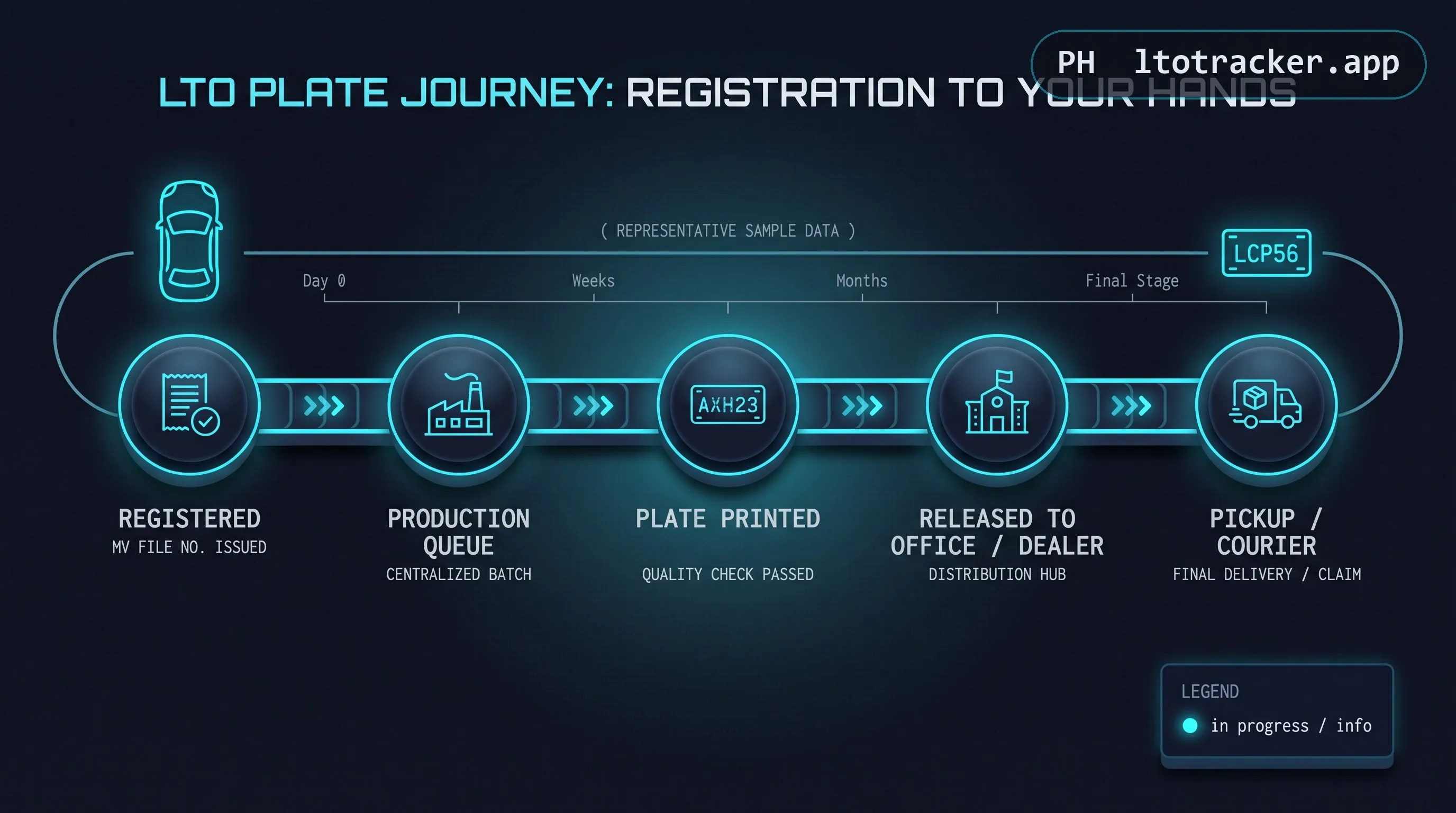
Understanding the full pipeline makes the waiting period far less confusing, so here is what actually happens between the day you register and the day your plate arrives. Most of the frustration motorists feel during this stretch comes not from the wait itself but from not knowing which stage their vehicle is currently sitting in, so walking through each stage in order is the fastest way to build accurate expectations.
Step one: registration and MV File Number assignment. When you register a brand-new vehicle at an LTO-NCR New Registration Unit, the office issues you a Certificate of Registration (CR) and an Official Receipt (OR) immediately. Since no physical plate exists yet, LTO assigns your vehicle an MV File Number instead, a reference code unique to your transaction that will later be linked to your permanent plate number once one is produced. This step typically happens the same day you complete paperwork at the dealership or LTO office, and it is the only step in the entire pipeline that occurs in person and on a predictable schedule.
Step two: batching for production. Vehicles are grouped into production batches by registering office and by vehicle type, since cars and motorcycles are manufactured on separate plate runs. Your MV File Number's queue position depends on when your batch was submitted for production, not on when you personally registered relative to other individuals.
Step three: manufacturing. Plates are physically manufactured by LTO's central plate making facility. This step is the one most affected by nationwide backlog, and it is also the step individual district offices have the least visibility into, which is why front-line LTO staff often cannot give you a specific date either. This is also true for driver's license cards, which are printed centrally rather than issued on the spot. Because this stage is centralized rather than handled per office, your registering LTO branch genuinely cannot speed up manufacturing on your behalf even if you ask in person, which is worth knowing before assuming a particular office is simply being unhelpful.
Step four: release to the registering office or courier. Once your plate, license card, or CR is manufactured, it is released back down to the LTO-NCR office that handled your original registration, or handed to a courier partner for delivery. This is the exact moment an LTO tracker tool becomes useful, because it is the first point where a status check will return anything other than "not yet in the database." Between manufacturing and this release step, there is typically a short internal transit and processing window, which is one more reason a status can appear to jump suddenly from no record found to fully ready, rather than moving through visible intermediate stages.
Step five: pickup or delivery. Depending on your registering office and whether a delivery courier has been assigned to your batch, you either claim your plate or license in person at the LTO office indicated in your result, or a courier delivers it to your registered address. See the courier partners section below for how delivery tracking differs from LTO's own status tracking.
Understanding why the backlog exists in the first place makes the wait easier to accept, even if it does not make it shorter. LTO's centralized plate and license card production has to serve every New Registration Unit in NCR from a single manufacturing pipeline, so total wait time scales with how many vehicles are registered nationwide in a given period rather than with anything specific to your own transaction. Registration volume spikes around certain times of year, particularly when new vehicle models launch or when promotional financing drives a wave of purchases, and each spike pushes queue times out for everyone behind it. Procurement and supply issues affecting the physical plate material itself have also historically contributed to multi-month stretches of slower production. None of this is something a tracker, or LTO's front-line staff, can influence, which is why "how many days" rarely has a single reliable answer and why checking periodically remains the most practical approach.
While you wait, your CR, OR, and claim stub together serve as your proof of registration, and in most cases a temporary or conduction sticker issued at the time of purchase allows you to legally operate the vehicle on public roads in the interim. Keep these documents in the vehicle at all times during the waiting period, since they are what you will be asked to present if stopped, and they are also what you will need on hand to look up your MV File Number if you have not already noted it down separately.
How to Use LTO Tracker Step by Step
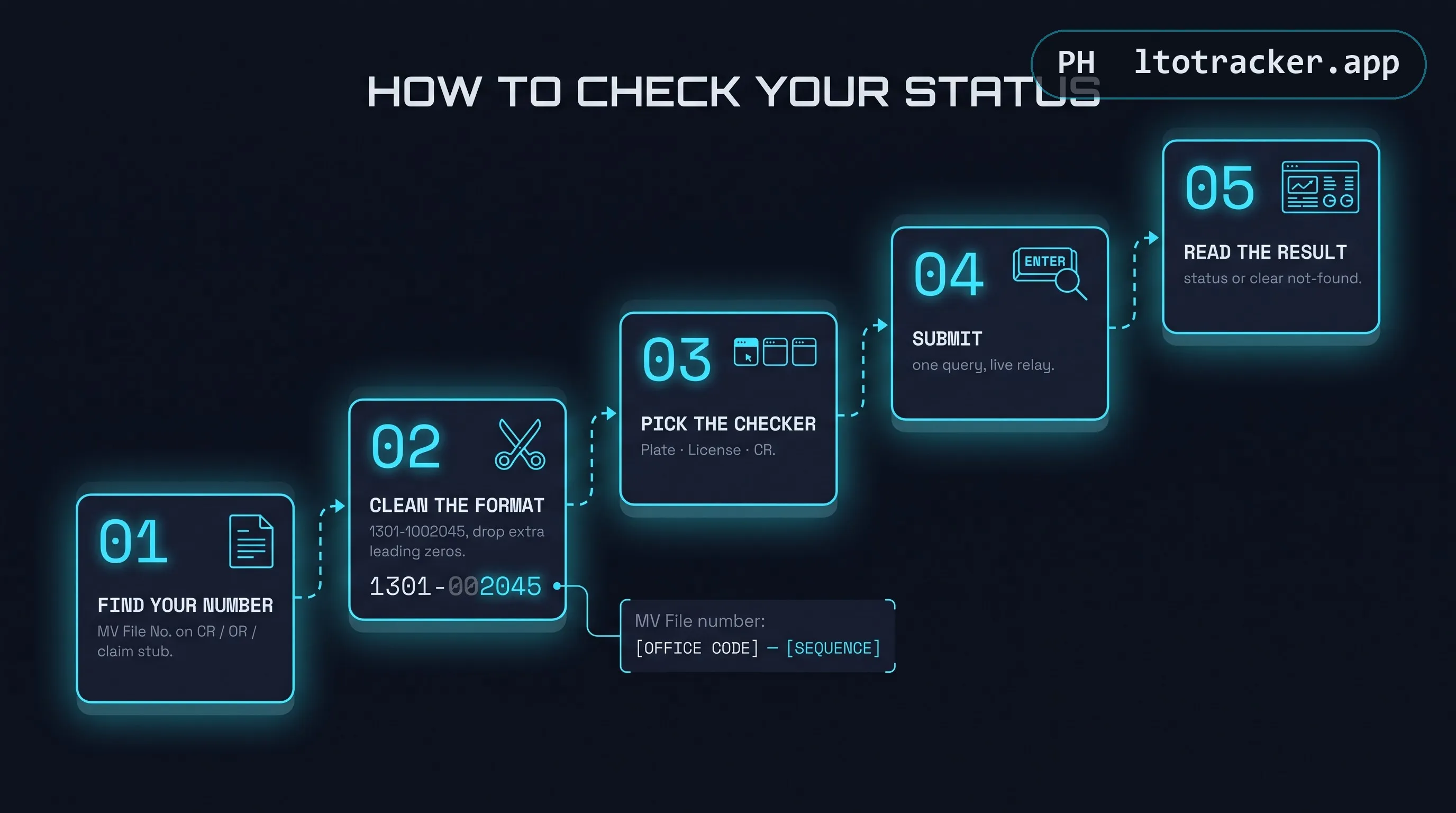
Whether you use LTO Tracker or check directly on the official LTO-NCR portal, the process is nearly identical. Here is how to use LTO tracker plate number lookups correctly on the first try.
- Find your reference number. Locate your MV File Number on your CR, OR, or claim stub. If your plate has already been printed and appears on your CR, you can search by plate number instead.
- Clean up the format. MV File Numbers are written with extra leading zeros on official documents that need to be removed before searching. If your document shows 1301-00001002045, type it as 1301-1002045 instead. Leaving the extra zeros in is the single most common reason a real, valid registration shows up as "not found."
- Choose the correct checker. Use the Plate / MV File checker for plate status, the License checker for a driver's license card, or the CR checker if you specifically need to confirm your Certificate of Registration has been released to your dealer.
- Submit and read the result carefully. A result will either show your status details (classification, releasing office, and date) or explain why nothing was found. Read the explanation rather than assuming it is an error. Most "not found" results have a specific, fixable cause.
- Check again periodically, not obsessively. Status does not update in real time on LTO's end. Checking once every few days is enough to catch a change; checking multiple times per hour will not make production go faster.
MV File Number Explained in Detail
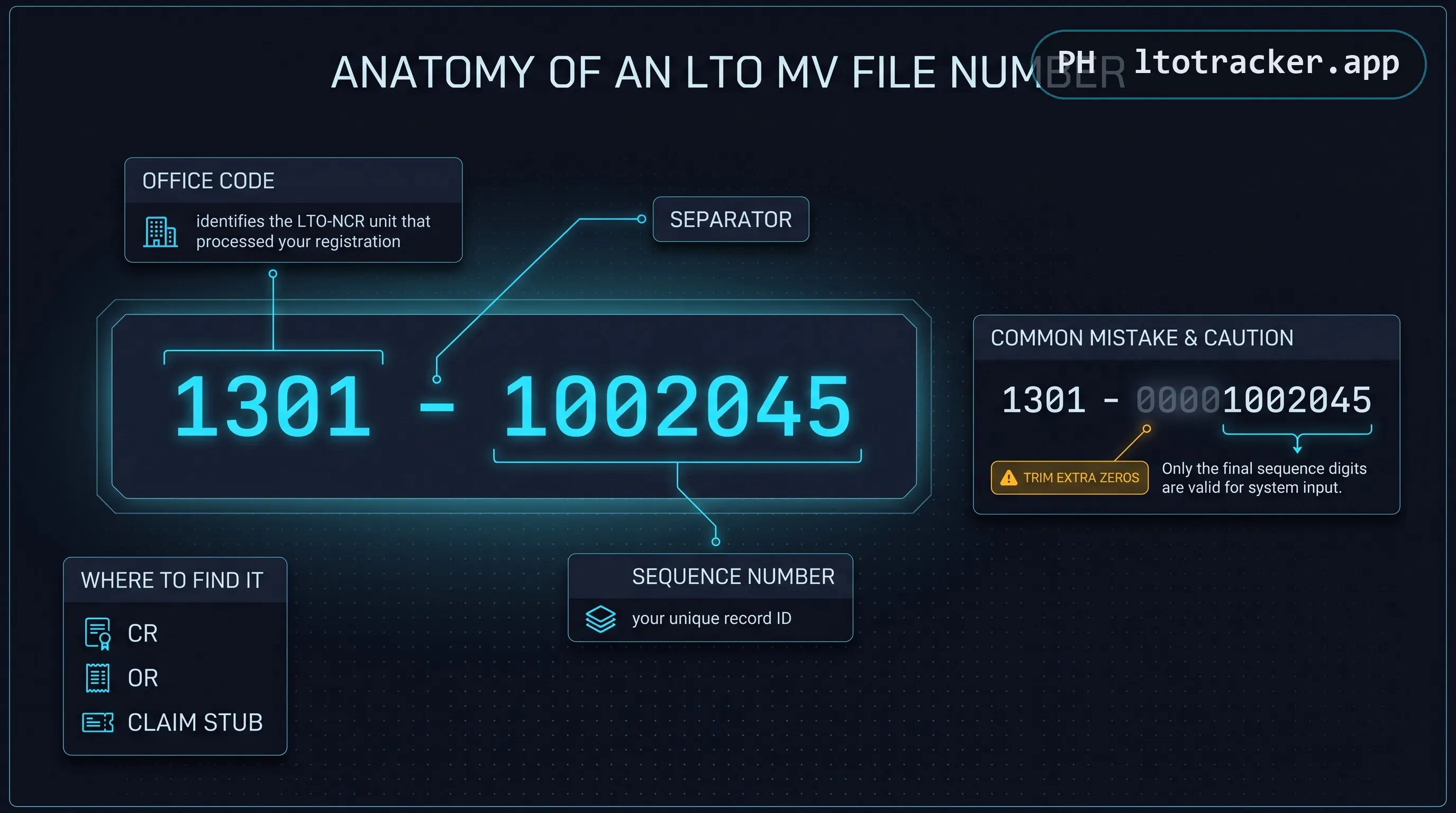
Since so many tracker searches revolve around the MV File Number specifically, it deserves its own close look. The number is structured as an office code, a dash, and a sequence number, for example 1301-1002045. The office code identifies which LTO-NCR New Registration Unit processed your vehicle: 1301 and 1303 are Regional Office units, 1801 is a separate NCR unit, and 1336, 1366, and 1380 correspond to Mandaluyong, Muntinlupa, and Quezon City District Offices respectively. If your MV File Number starts with a different prefix, your registration was processed outside LTO-NCR's New Registration Unit network, and tools scoped to that network, LTO Tracker included, will not have your record.
A frequent point of confusion is that the number printed on official paperwork sometimes includes extra zeros that are not part of the searchable format. Always search using the trimmed version. If you are unsure which digits to drop, the rule is simple: keep the four-digit office prefix, keep the dash, then drop leading zeros from the sequence number that follows until you are left with a shorter numeric string, typically six to seven digits.
It is worth emphasizing that the MV File Number itself never changes, expires, or needs to be reissued, regardless of how long your plate takes to produce. Whether your wait ends up being three weeks or eight months, the same reference number you were given at registration remains valid and searchable for the entire duration, so there is no need to request a new one or worry that an old MV File Number has gone stale simply because time has passed.
For a deeper walkthrough with annotated document examples, read our dedicated MV File Number lookup guide.
Every Reference Number You Might Need, Explained
Motorists often arrive at a tracker holding several different numbers printed across their paperwork and are not sure which one actually belongs in the search box. Here is a plain breakdown of each one and which checker it belongs to.
MV File Number. Format: four-digit office code, a dash, then a numeric sequence, for example 1301-1002045. Used for the Plate / MV File checker when no plate number exists yet. This is the single most searched reference type, reflected in queries like "lto tracker mv file," "mv file lto tracker," and "lto plate tracker using mv file number."
Plate Number. Format: letters followed by digits, for example NAS2000 or a space-separated variant like NCP 9085. Used once your plate has physically been produced and appears on your CR, or for the CR checker specifically. Note that an already-installed plate visible on a vehicle has, by definition, already been released, so searching it in the pending-status checker will correctly return no result: the record has already left the pending queue.
Driver's License Number. Format: a letter followed by a structured numeric sequence, for example N01-01-012345. Used exclusively for the backlog driver's license card checker, unrelated to plate or vehicle status entirely.
OR and CR Numbers. Printed on your Official Receipt and Certificate of Registration respectively. These are proof-of-transaction documents rather than search inputs for any of the checkers on this page, though you will need the CR itself on hand to locate your MV File Number or confirmed plate number in the first place.
What Each Field in Your Result Actually Means
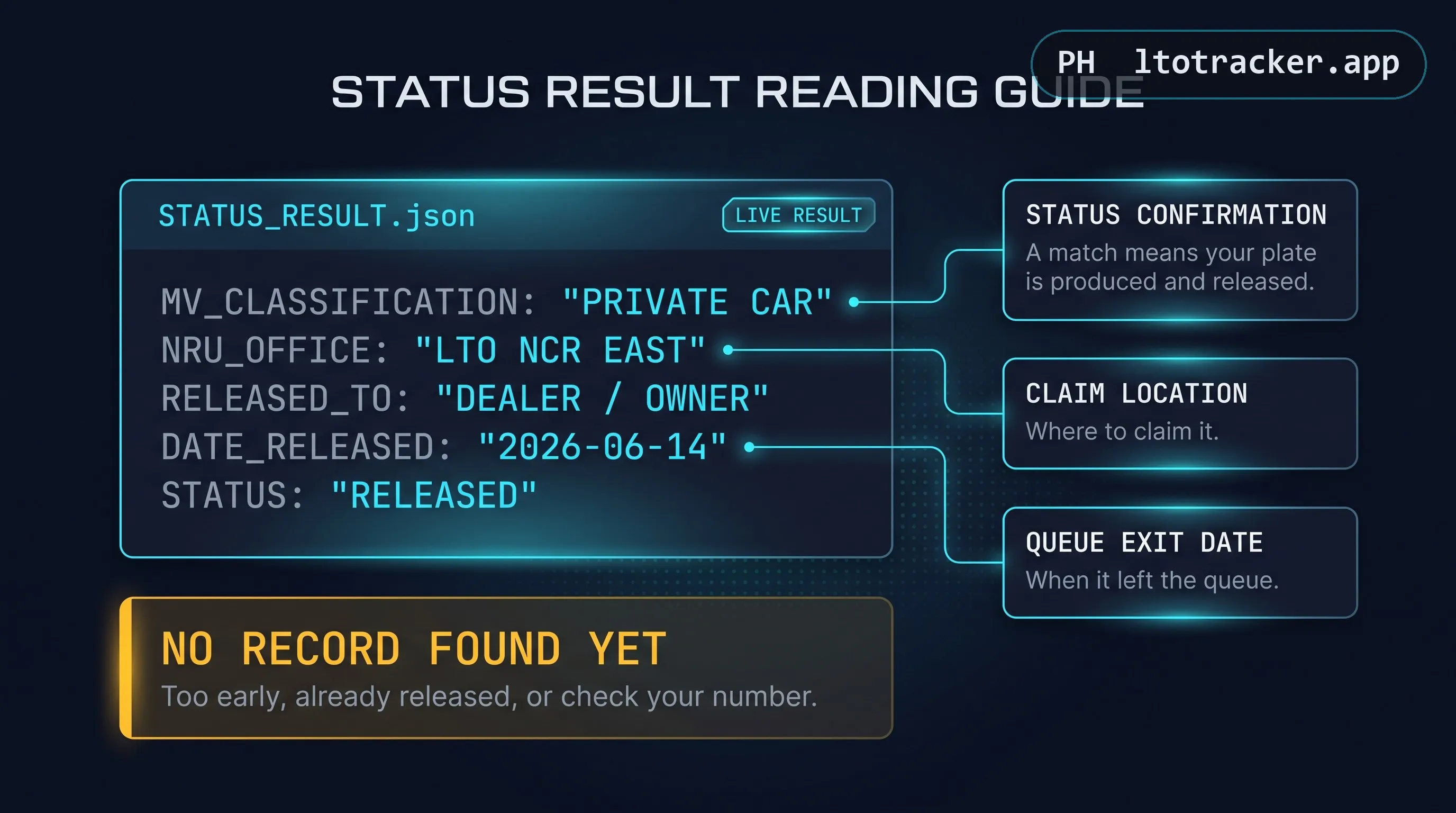
A successful plate or MV File Number result typically includes a handful of specific fields, and knowing what each one means helps you read your own status correctly rather than guessing.
MV Classification describes the vehicle type on record, such as private car, motorcycle, or a specific commercial classification, and confirms the lookup matched the correct vehicle type tied to your MV File Number. NRU Office (or LTO Office) identifies exactly which LTO-NCR New Registration Unit is holding your plate for release or coordinating your delivery, which is also the office you should contact directly for any follow-up. Released To generally reflects the dealer or claiming party the plate was released to, since brand-new vehicle plates are typically released through the dealer rather than directly to the individual owner. Date Releasedis the date your plate left LTO's production facility for the registering office or courier, which is not necessarily the same date you will personally receive it, especially if delivery or in-person pickup is still pending after that date.
For the CR checker specifically, results are organized as Plate Number, MV Type, LTO Office, Name of Dealer, Date Released, and Remarks, mirroring the same underlying logic: confirmation that your document has moved from production into the release and claiming stage.
Common Search Phrases and What They Actually Mean
Because this topic gets searched so many different ways, it is worth clarifying that phrases like "lto tracker portal," "lto tracker platform," "lto tracker system online," and "lto tracker application" are generally describing the exact same underlying idea from slightly different angles, rather than referring to distinct products you need to seek out separately.
"Portal" and "platform" both describe the website or web-based interface itself, the page you interact with to submit a reference number and view a result. "System online" typically reflects someone confirming that the checker is currently working and reachable, as opposed to showing a maintenance or service-unavailable message. "Application" in this context almost always means the online tool itself rather than a downloadable mobile app, since, as covered earlier, no official standalone LTO tracker app exists. Recognizing these as different words for the same thing can save you from searching the same need five different ways expecting five different results.
Plate Number Tracking in 2025 and 2026
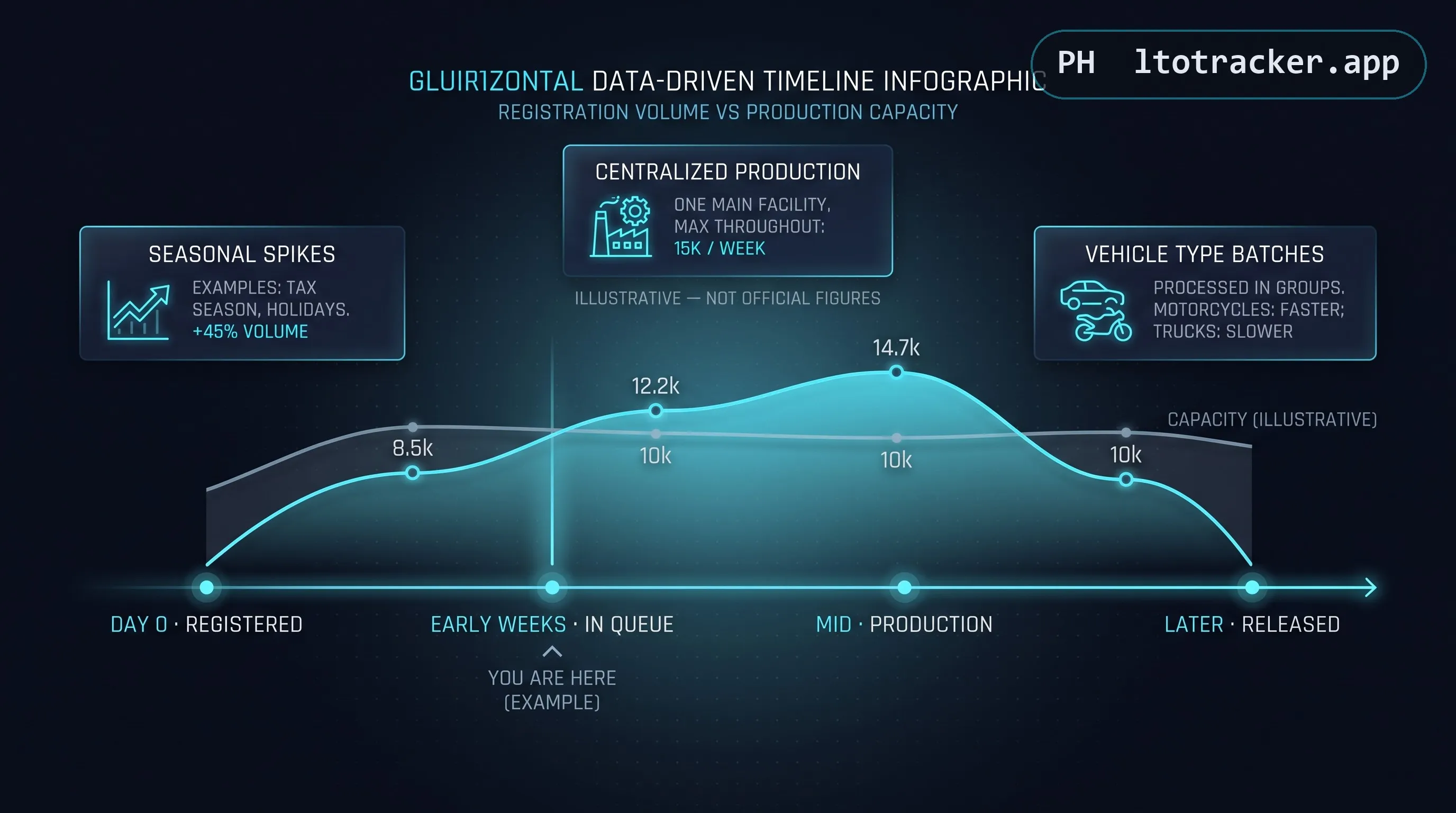
Search interest in "lto tracker plate number 2025" and "lto tracker plate number 2026" spikes every year for the same reason: motorists assume the backlog and the tools available to check it change on a calendar basis. In practice, the underlying LTO-NCR inquiry system does not reset or change format at the start of a new year. Your MV File Number and the checking process remain valid regardless of which year you registered in, as long as your registration record still exists in LTO-NCR's active database.
What does change year to year is the size of the backlog itself, driven by registration volume, LTO's plate production capacity, and occasional supply disruptions. A registration from earlier years that was never picked up can, in rare cases, still show a valid pending status well into a later year. If your vehicle was registered more than twelve months ago and still shows no result, that is unusual enough to warrant a direct follow-up with your registering LTO office rather than relying on an online checker alone.
Driver's License Card Tracking
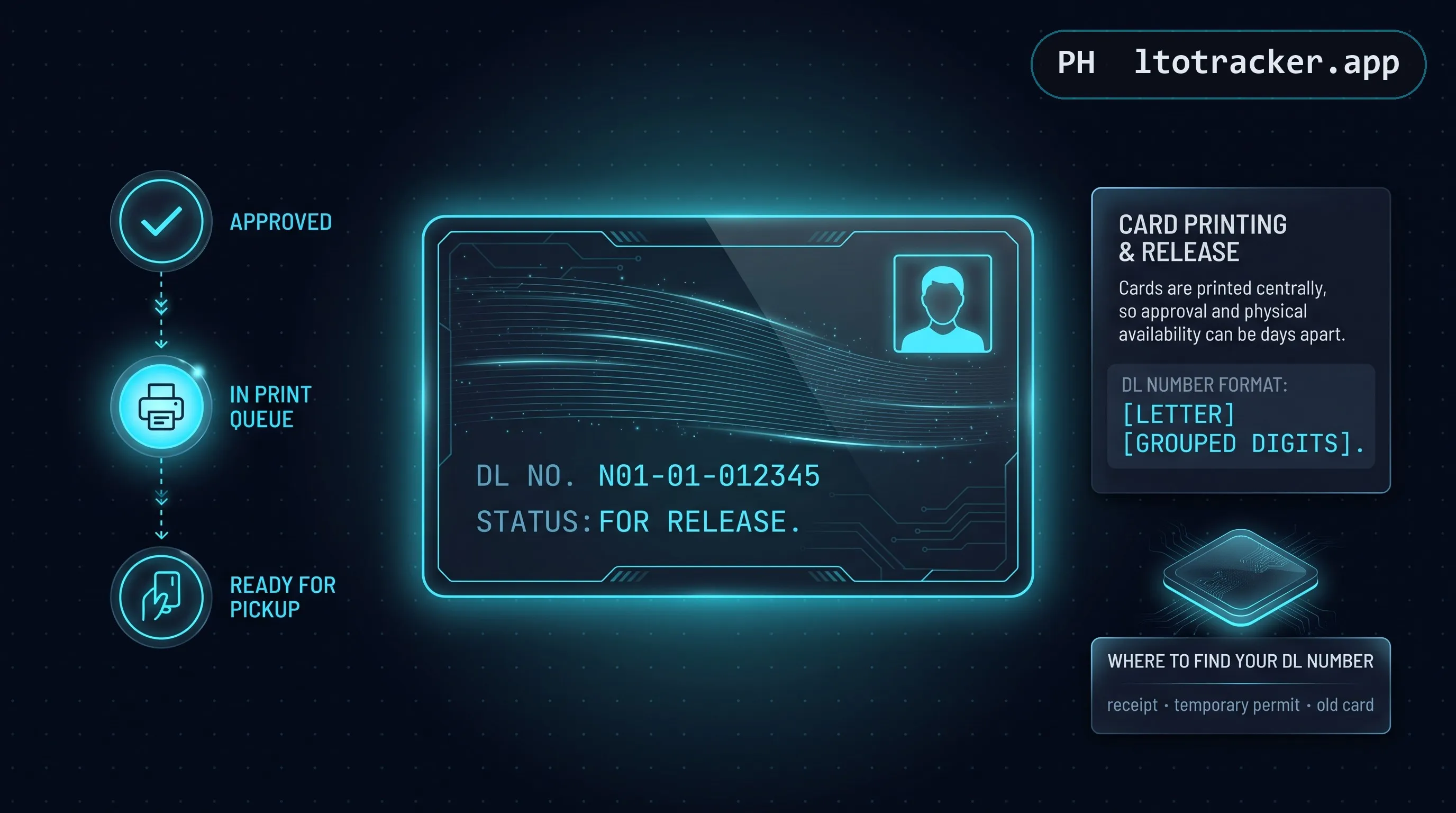
Backlog driver's license card tracking works on a similar principle to plate tracking, but through a separate system and a separate reference number, your Driver's License Number rather than your MV File Number. This applies specifically to license cards that were approved but not yet printed and released, commonly the result of LTO's periodic backlog in card production rather than any issue with your application itself.
To check, you need your Driver's License Number exactly as issued, in the format shown on your receipt or temporary license, for example N01-01-012345. A result will either confirm your card is ready for pickup or explain that no matching print request currently exists, which usually means your request has not yet reached the printing queue rather than that anything was lost. Full details are in our driver's license delivery status guide.
Certificate of Registration (CR) Tracking
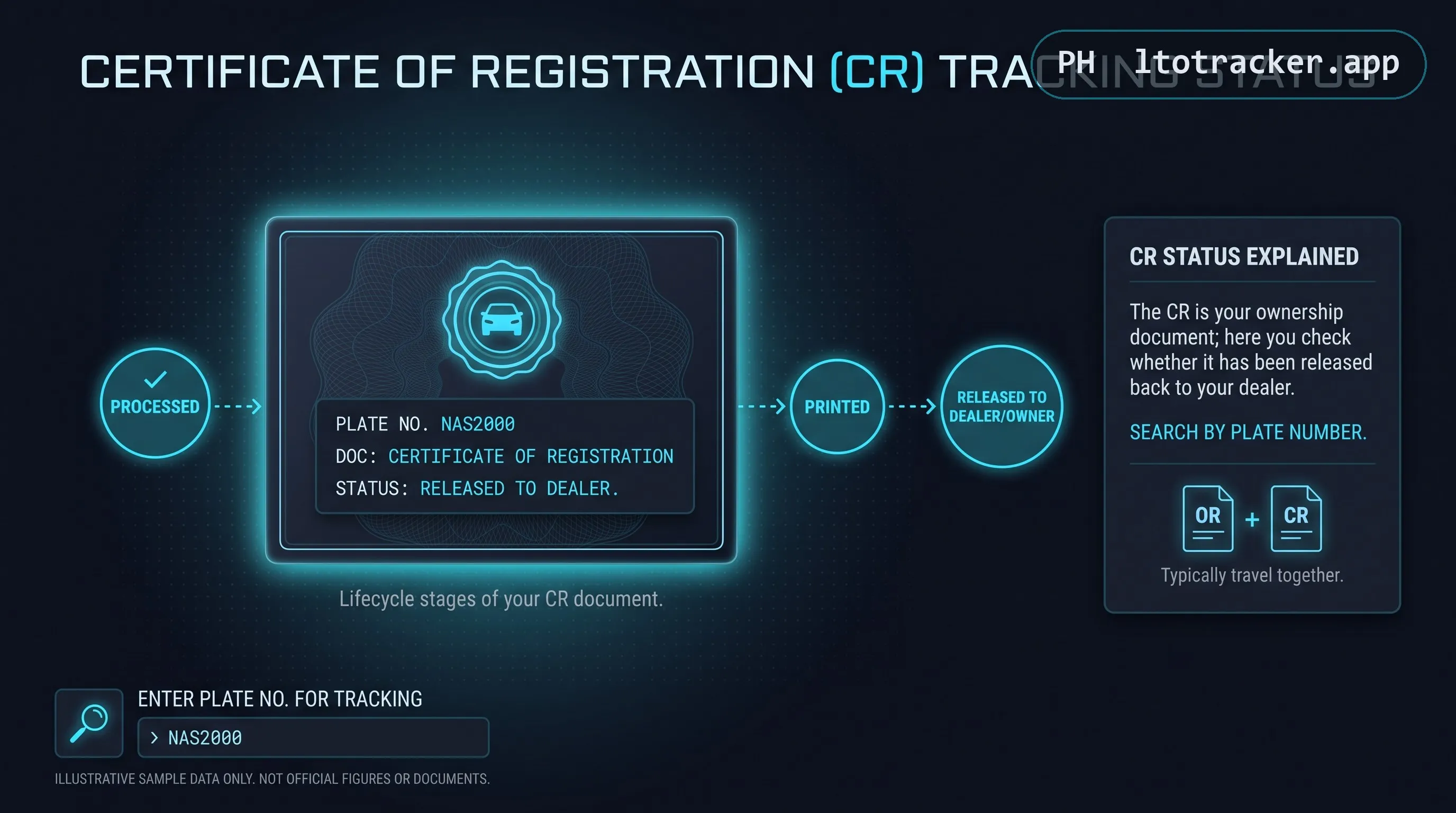
A less commonly known but equally useful check is CR tracking, sometimes searched as "lto or cr tracker" or "lto orcr tracker." This specifically answers whether your Certificate of Registration document, as opposed to your physical plate, has been released back down to your dealer. This matters because dealers sometimes hold a vehicle's CR temporarily even after the plate itself has already been handed over, or vice versa, and the two releases do not always happen on the same day.
CR tracking is searched by plate number rather than MV File Number, and only covers CRs tied to brand-new vehicle or motorcycle registrations initially processed at LTO-NCR's New Registration Unit offices, the same 1301 and 1303 scope as the plate checker.
Account, Sign Up, and Login: Do You Need One
Searches like "lto tracker sign up," "lto tracker create account," "lto tracker login," and "register lto tracker" suggest many motorists expect a tracker to work like a typical online service, where you register an account before doing anything useful. That expectation does not match how this type of checker actually works, and it is worth being direct about it: there is no account to create.
Checking your plate, MV File Number, driver's license, or CR status is a public, unauthenticated lookup. You submit a reference number, the system checks it against its database, and you get a result. No username, password, email verification, or profile setup is involved anywhere in that process, on LTO Tracker or on the official LTO-NCR portal it relays to. If a site asks you to register an account, verify your email, or set a password purely to check a status, that is not how the legitimate process works and is worth treating with suspicion.
Where an actual login does apply is LTMS, covered in the next section, which is a genuinely different system built for transacting rather than checking.
LTO Tracker vs LTMS vs eGovPH: Three Different Things
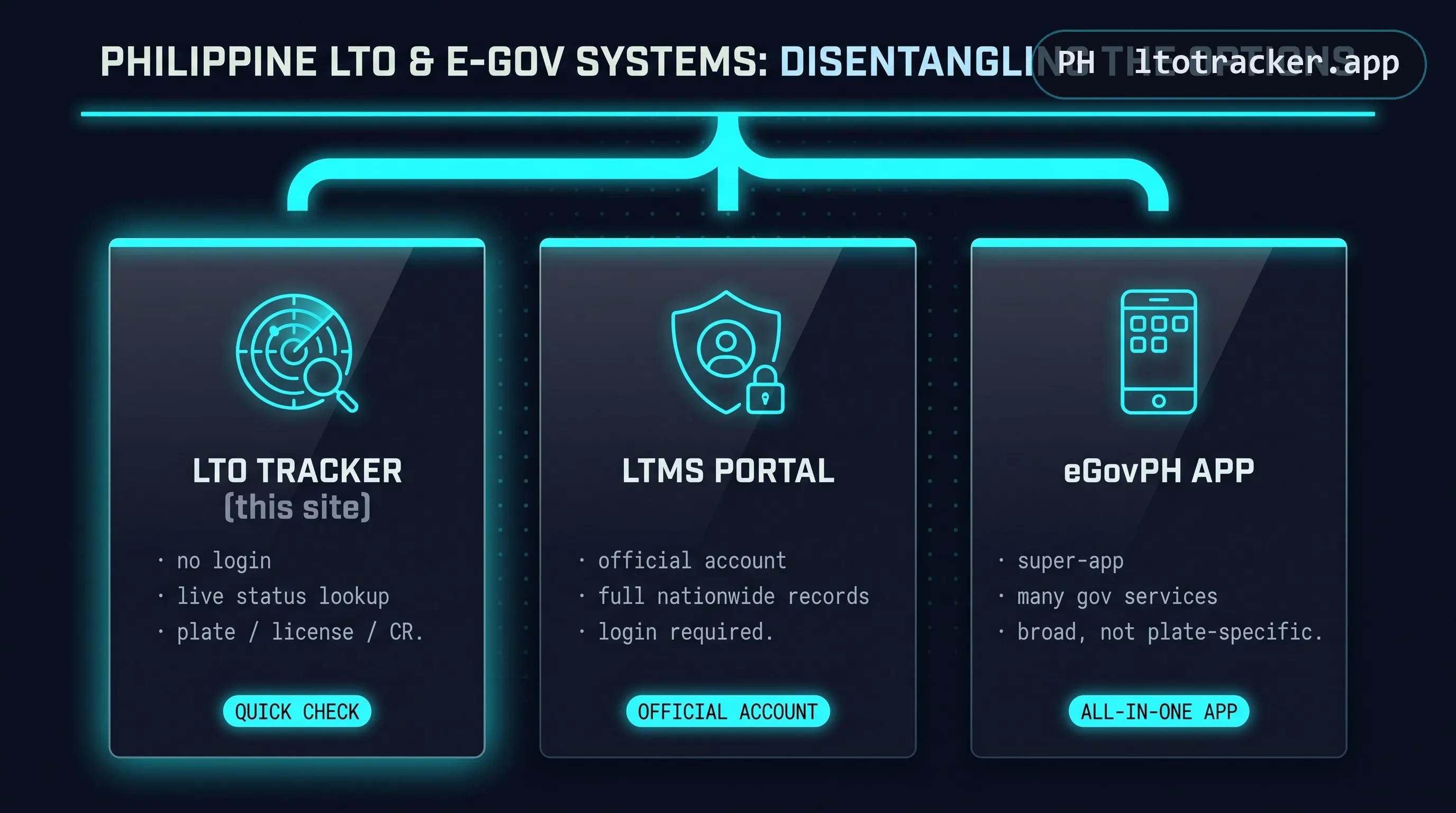
Three names get conflated constantly in search behavior, so it is worth separating them clearly, once and for all.
An LTO tracker (the category this site belongs to, and the source of this page's name) refers to independent, third-party tools — this one included — that relay a status query to LTO-NCR's public plate, license, or CR inquiry endpoints and display the result. No account required, NCR-scoped coverage only, free to use.
LTMS (Land Transportation Management System) is LTO's own official, nationwide digital platform, accessed at portal.lto.gov.ph, used for actual transactions: registering a vehicle, renewing registration, booking a driving school or licensing appointment, and managing your account-linked records. LTMS requires you to create and log into a real account, unlike a status tracker.
eGovPH is a separate government super-app covering services across many different Philippine agencies, not built or maintained by LTO specifically and not a substitute for either LTMS or an LTO plate tracker. If you are looking specifically for plate, license, or CR production status, eGovPH is not the right place to look.
Understanding which of these three you actually need saves a lot of wasted searching. If you are transacting (registering, renewing, booking an appointment), you need LTMS and an account. If you are simply checking whether something already filed is ready, you need a tracker like this one, and no account at all.
Regional Coverage: What This Tool Can and Cannot See
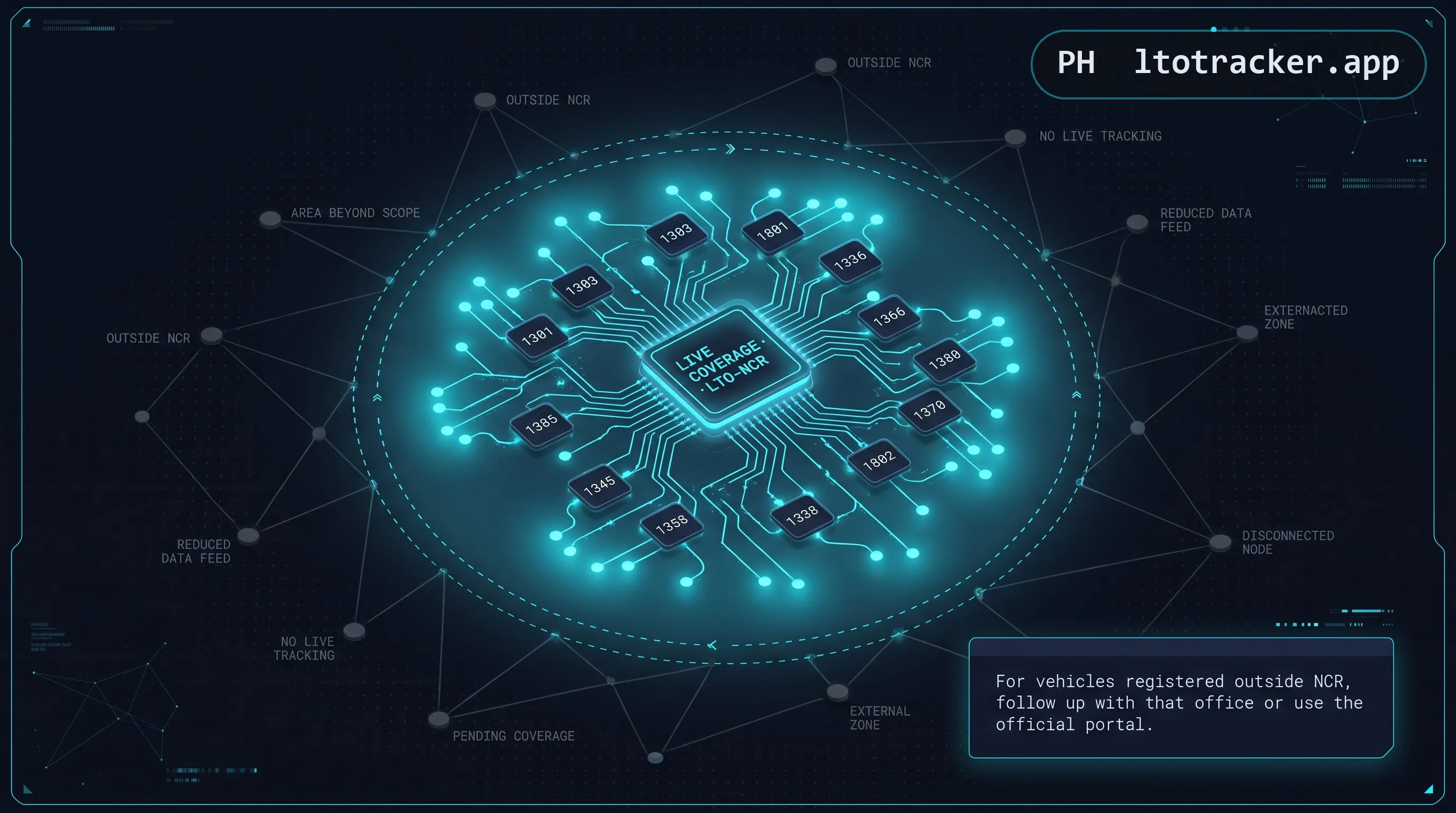
This is the section most trackers gloss over, and it is the one worth reading most carefully if you registered your vehicle outside Metro Manila. Search terms like "lto tracker region 7," "lto plate tracker region 3," "lto tracker near cebu city," and "lto plate tracker calabarzon" all reflect a genuine gap: LTO-NCR's public plate, license, and CR inquiry tools, and by extension LTO Tracker, only contain records for vehicles whose initial registration was processed at an LTO-NCR New Registration Unit. That means Metro Manila offices exclusively.
This is a deliberate scope decision rather than an oversight, and it is worth explaining honestly rather than glossing over. LTO's regional and provincial offices operate their own record-keeping and release processes somewhat independently of NCR's systems, a structural reality of how LTO is organized rather than a single unified national database everyone draws from. Building a tracker that convincingly claims nationwide coverage without actually having access to every region's internal release data would mean either silently failing for a large share of users or fabricating results, neither of which this guide is willing to do. Being upfront about a narrower, genuinely working scope is more useful in practice than a broader claim that cannot actually be honored.
If your vehicle was registered in Cebu, Mandaue, Region 3, Region 4A (Calabarzon), Region 2, Region 11, or any provincial LTO district office, no NCR-scoped tracker will have your record, no matter how the tool is branded. This is not a bug or a limitation specific to LTO Tracker; it reflects how LTO structures its own regional inquiry systems, which are generally not unified into a single nationwide public lookup. Your correct next step is to follow up directly with the specific LTO district or regional office where you registered, since they maintain their own release records independently of NCR.
LTO-NCR Offices and Licensing Centers This Tool Covers
Since coverage is limited to LTO-NCR, it helps to know exactly which offices fall under that umbrella. LTO-NCR operates district offices, extension offices, and licensing centers spread across Metro Manila, including Caloocan, Diliman, La Loma, Las Piñas, Makati, Malabon, Mandaluyong, the Manila East, North, South, and West District Offices, Marikina, Navotas, Muntinlupa, Novaliches, Parañaque, Pasay, Pasig (including its city extension office), Pateros, Quezon City (district and extension offices), San Juan, Taguig, and Valenzuela, alongside specialized centers such as the Public Utility Vehicle Registration Center (PUVRC), the South Motor Vehicle Inspection Center (SMVIC), and the Vehicle Renewal Facility (VREF).
Driver's license transactions in particular are also handled through dedicated Licensing Centers (in Caloocan, Las Piñas, Manila, Parañaque, Pasay, Quezon City, San Juan, Taguig, and Valenzuela) and a network of mall-based Driver's License Renewal Outlets (DLROs) at locations including Alabang Town Center, Ali Mall, Araneta City, Ayala Malls Circuit, Eastwood, Fisher Mall, Robinsons Galleria, Robinsons Place Manila, SM North EDSA, and several others across the metro. Note that a DLRO renewal transaction is a different service from the backlog license card checker described earlier in this guide.
If you are searching "lto tracker near quezon city, metro manila" or "lto tracker near manila, metro manila" specifically to confirm which office holds your record, the office code embedded in your MV File Number (1301, 1303, 1801, 1336, 1366, or 1380) is a faster and more precise way to identify it than searching by neighborhood name, since a single geographic area can be served by more than one office code depending on transaction type.
For motorists outside NCR searching "lto tracker region 1," "lto tracker region 2," "lto tracker region 3," "lto tracker region 4a," "lto tracker region 7," or "lto tracker region 11," the honest answer is the same across all of them: LTO's regional and provincial district offices generally do not expose a unified public web tracker the way LTO-NCR does. Your most reliable option is a direct follow-up call or visit to your specific registering office, or, if your transaction was processed through LTMS, checking your account status there, since LTMS is nationwide rather than NCR-specific.
Is LTO Tracker Legit
"Is LTO tracker legit" and "is LTO tracker down" are two of the most common questions motorists ask before trusting any of these tools with their personal registration details, and it is a fair question given how many similarly named sites exist. Here is how to evaluate any LTO tracker site, including this one.
- A legitimate tracker never asks for your full LTMS account password. Checking a plate or MV File Number status is a public, unauthenticated lookup and never requires login credentials.
- A legitimate tracker never charges a fee to reveal your result. If a site asks for payment to "unlock," "expedite," or "confirm" your status, that is not a real part of LTO's process.
- A legitimate tracker's results should match what the official LTO-NCR portal shows for the same query. If you are ever in doubt, cross-check directly on LTO-NCR's own site.
- A legitimate tracker discloses that it is independent and unaffiliated with LTO or DOTr, rather than implying it is an official government property.
LTO Tracker meets all four criteria by design. Every result panel on this site includes a note confirming it was relayed live from the official LTO-NCR system, and our About page explains exactly how the relay works and what data, if any, is retained (none). If a tracker site is temporarily down or shows a service unavailable message, that typically reflects downtime on LTO-NCR's own servers rather than a problem with the third-party interface, since these tools have no independent data source of their own.
Beyond the four core criteria above, watch for these more specific red flags before entering any information on a tracker site. A pop-up demanding your phone number before showing a result is not part of the legitimate LTO process. A page that visually mimics LTO's official seal, logo, or a real government portal's exact layout, rather than presenting its own independent design, is attempting to look official rather than being official, and that distinction matters. A checker that shows a result immediately for literally any input, including random or clearly invalid numbers, is not actually performing a live lookup at all, and any data it displays is fabricated. And any request to download an app or browser extension just to check a status should be treated with real suspicion, since the legitimate tools work entirely in a standard browser.
One more practical test worth applying: check whether the site can explain, in plain language, exactly what happens to your reference number after you submit it. A trustworthy tracker should be able to answer that question directly, as this page does throughout its privacy and relay sections, rather than hiding behind vague reassurances like "your data is safe with us" without any specifics behind the claim. Vagueness where specificity would be easy to provide is itself a mild but meaningful warning sign.
Why So Many Sites Are Called "LTO Tracker"
If you have noticed a long list of similarly named results (lto tracker, lto tracker 2, ltotracker.com, lto tracker.com.ph, lto tracker system online, and more) while searching, that is not a coincidence and it is not any single company's official brand. Because LTO itself never published one definitive, nationally branded consumer app under the name "LTO Tracker," the phrase became a generic, commonly searched description rather than a trademark, and multiple independent developers and small teams have each built their own interface around the same underlying LTO-NCR public inquiry data.
This is a normal, if slightly confusing, pattern in Philippine consumer tech: a genuine public need (in this case, an easier way to check LTO's status without navigating government web forms) attracts several independent solutions rather than a single official one. It also means the burden of judging legitimacy falls on the individual site's practices (does it ask for payment, does it require a password, does it disclose that it is independent) rather than on the name alone, since the name "LTO Tracker" by itself says nothing about who built a given site or how carefully it handles your query.
What Motorists Are Saying
Search behavior around terms like "lto tracker reddit" and "lto tracker review" reflects a genuine pattern: before trusting a government-adjacent tool with any registration details, many people reasonably want to see what other motorists have experienced first. Discussion threads on Filipino motoring forums and community boards tend to circle around the same handful of themes, which line up closely with the topics covered throughout this guide.
The most common thread is frustration with wait times rather than with any specific tracker tool, since production backlog is the actual bottleneck and no interface, however well designed, can change that. The second most common thread is confusion between the different systems this page disambiguates: plate delivery versus violation status, LTO Tracker versus LTMS, and NCR coverage versus regional gaps. The third recurring theme is caution around unfamiliar sites, particularly ones requesting payment or personal information beyond a reference number, which reinforces exactly the legitimacy checklist covered earlier in this guide.
Reading community discussion is a reasonable way to calibrate expectations, but it is worth remembering that individual experiences vary by office, by batch, and by season, so a single frustrated post about a multi-month delay is not necessarily representative of every registration, and a single smooth experience is not a guarantee either.
Delivery Tracker vs Violation Tracker: Do Not Confuse These
A meaningful number of people searching "lto violation tracker," "lto ncap tracker," or "lto apprehension tracker" are actually looking for a plate or license delivery status and land on the wrong kind of tool, so it is worth being explicit about the difference.
Plate, license, and CR delivery tracking (what this page and LTO Tracker's checker cover) tells you whether a document or plate tied to a brand-new registration has been produced and is ready for release. It has nothing to do with your driving record.
Violation and NCAP tracking is a completely separate concern that checks whether your vehicle, by plate number, has any recorded traffic violation, apprehension, or No Contact Apprehension Program ticket on file, typically issued by LTFRB, local traffic enforcement units, or LTO's own apprehension arm. A clean or pending status on the delivery tracker tells you nothing about whether you have unpaid violations, and a clean violation record tells you nothing about whether your plate has been produced.
For the full breakdown of LTO versus LTFRB versus PNP Highway Patrol Group vehicle systems, and which one actually handles what, read LTO vs LTFRB vs HPG explained.
Courier Partners and Delivery Status
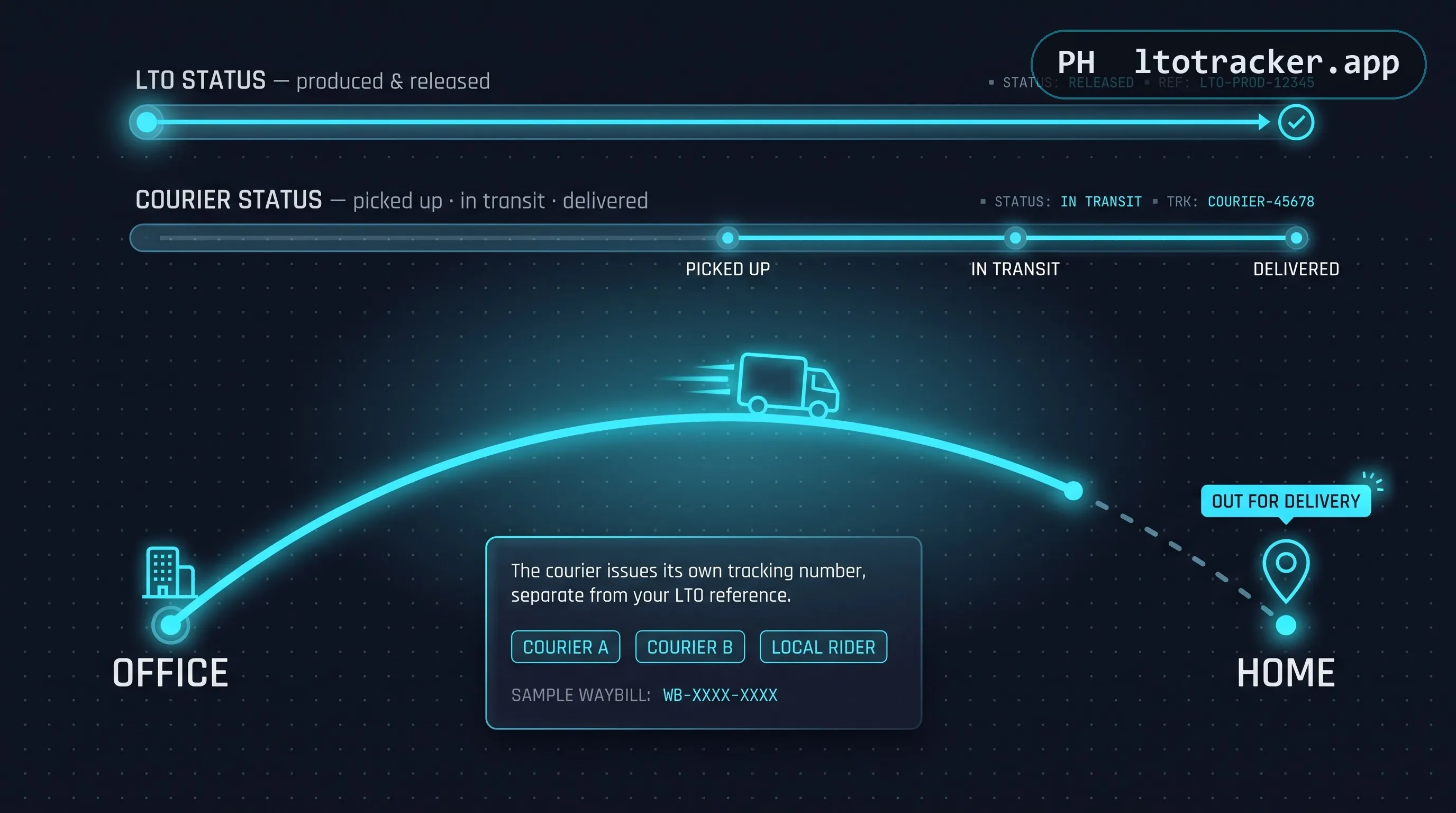
Once your plate, license card, or CR is confirmed ready, delivery to your address (where available) is typically handled by a third-party courier rather than LTO staff directly. Names that show up frequently in motorists' experiences include GoGo Xpress, 2GO Express, Go21, and Lalamove, though the specific partner assigned can vary by LTO-NCR office and by time period. LTO periodically reassigns or adds courier partners as contracts change, so the specific company handling deliveries today may differ from what earlier discussions online describe, which is one more reason to trust the name shown in your own current result over older forum posts or outdated guides.
GoGo Xpress has been one of the more frequently mentioned delivery partners for LTO-NCR plate and card releases in recent periods. If GoGo Xpress is named in your result, they issue their own separate tracking reference once your item is in their hands, checkable directly through their own customer channels rather than through LTO's system.
2GO Express, a long-established Philippine logistics and courier company, has also been used for LTO document and plate delivery at various points. As with any courier partner, 2GO's own waybill or tracking number, not your MV File Number, is what their tracking system expects.
Go21 and Lalamove round out the courier names that have appeared in motorists' delivery experiences, generally for time-sensitive or localized last-mile delivery within Metro Manila. Availability of any specific courier is determined by LTO-NCR and your registering office, not by anything you can select or request as the vehicle owner.
It is important to separate two different kinds of tracking at this stage. LTO's own status (what LTO Tracker's checker shows you) tells you that your item has been released for delivery. The courier's own tracking number and tracking page, issued separately once your item is handed to them, tells you delivery-specific milestones like "picked up," "out for delivery," or "delivered." If your LTO status says released but you have no courier tracking number yet, the item may still be awaiting handoff to the courier, which is a normal short gap rather than something to be concerned about immediately.
If only a pickup option is shown with no delivery option at all, your batch was not assigned a courier, which typically happens for offices or areas outside a courier's current serviceable zone. In that case, in-person pickup at the office indicated in your result is the only route to claiming your item.
Pickup vs Delivery: Which Should You Choose
When both options are available to you, the right choice depends less on preference and more on your own timeline and location relative to your registering LTO office. In-person pickup at the office indicated in your result is generally the faster route once your status shows released, since it removes courier transit time entirely and lets you claim your plate, license, or CR the moment you can get there during office hours. The tradeoff is your own time and travel, particularly if your registering office is far from where you currently live or work.
Delivery, where offered, trades a small amount of additional waiting time (for the courier handoff and transit) for the convenience of not needing to visit the office at all. It is generally the better option if your registering office is inconvenient to reach, if you have limited availability during office hours, or if you simply prefer not to add an errand to an already busy schedule. Keep in mind that a delivery option, where offered, is not guaranteed to be faster overall than pickup, since it depends on courier scheduling and your address falling within an active serviceable zone.
Whichever route applies to you, the LTO Tracker status check itself does not change: you are confirming whether your item is ready for release, and the pickup-versus-delivery question is answered by what option, if any, appears in that same result.
Troubleshooting Common LTO Tracker Issues
A handful of issues account for the vast majority of confused or frustrated tracker searches. Here is how to resolve the most common ones.
"Information not found" for a registration you are sure is correct. Check the format of your MV File Number first (extra zeros are the most common culprit), then confirm your registration was processed at an LTO-NCR New Registration Unit rather than a provincial office, and finally consider that registrations submitted within the last one to three business days may not have propagated into the lookup database yet.
"Service unavailable" or the checker not loading at all. This reflects the availability of LTO-NCR's own servers, which any relay-based tracker depends on. Try again after a short wait. If the issue persists for more than a day, it is worth checking LTO-NCR's official social media channels for any announced maintenance.
"Unable to submit" errors. This is usually caused by an invalid character or format in the reference number field rather than a server problem. Re-check for stray spaces, letters where only numbers belong, or a missing dash.
Status has not changed in months. Unfortunately, this reflects a genuine LTO production backlog rather than a tracker malfunction. There is no way to expedite production through an online tracker, and no legitimate tracker offers an expedite option. Persistent multi-month delays are best escalated directly with your registering LTO office.
The result shown does not match your vehicle details. This is rare but worth flagging immediately if it happens, since it can indicate a data entry error on LTO's side during your original registration rather than anything wrong with the checker itself. Bring your CR and OR to your registering office so staff can correct the record directly, since a tracker has no ability to edit or correct information on your behalf.
The page loads but the checker itself will not accept any input. This is almost always a browser-side issue rather than a server one: try refreshing the page fully, clearing your browser cache, or switching browsers if the problem persists. Since the checker requires no login or stored session, a fresh page load resolves the vast majority of these cases immediately.
Common Mistakes That Cause a Failed Lookup
Beyond the format issues already covered, a few less obvious mistakes account for a surprising share of failed searches. Reviewing this list before assuming something is broken can save you a wasted trip or an unnecessary follow-up call.
- Searching too soon after registration. Records typically need a few business days to appear in the lookup database after your registration is filed. Searching the same day or the day after will usually return nothing, which is expected rather than an error.
- Mixing up MV File Number and plate number fields. Each checker expects a specific format. Entering a plate number into a field expecting an MV File Number, or vice versa, will fail validation rather than return a useful result.
- Using a number from the wrong document. Some paperwork includes multiple numbers close together (OR number, CR number, MV File Number, engine and chassis numbers). Double-check the label directly above or beside the number you are copying.
- Assuming a tracker searches nationwide. As covered in the regional coverage section, NCR-scoped tools simply do not contain records from other regions, regardless of how the search interface looks.
- Confusing a violation check with a delivery check. Searching a plate number expecting violation or NCAP information on a delivery-focused tracker, or the reverse, will produce results that seem irrelevant because you are, in effect, asking the wrong system the wrong question.
Privacy and Data Handling
Because you are entering a reference number tied to a real vehicle registration, it is reasonable to ask what happens to that information once you submit it. On LTO Tracker, the answer is deliberately simple: your query is forwarded to the official LTO-NCR system at the moment you submit it, the response is displayed to you, and nothing about the query itself (the number you searched) or the result is logged, stored in a database, or retained after your browser session ends. There is no account tied to your search, no email collected, and no history saved that we could look up later even if asked to.
This design choice is intentional rather than incidental. A tracker that stored every MV File Number, plate number, and driver's license number searched through it, along with the personal details that come back in each result (like the dealer name in a CR release, or the classification of a private vehicle), would be accumulating a genuinely sensitive dataset over time, tying real people to real vehicles for no legitimate reason connected to the tool's actual purpose. Avoiding that accumulation entirely, by simply not storing anything in the first place, is a more effective privacy protection than any policy promising to handle stored data responsibly after the fact.
The only aggregate information retained is anonymous and operational: basic rate-limiting counters used to prevent abuse of the checker, which are not tied to any specific query content and are automatically cleared on a rolling basis. Full detail is available in our Privacy Policy.
A Quick Checklist Before You Search
If you want the fastest possible path to an accurate result, work through this short checklist before submitting your query.
- Do you have your CR, OR, or claim stub on hand to confirm the exact reference number, rather than relying on memory?
- Have you removed extra leading zeros from your MV File Number, keeping the four-digit office prefix and a shorter sequence number?
- Are you using the correct checker (Plate / MV File, License, or CR) for the specific reference number type you have?
- Was your vehicle registered at an LTO-NCR New Registration Unit (office codes 1301, 1303, 1801, 1336, 1366, or 1380), rather than a provincial or regional office?
- Has it been at least a few business days since your registration was filed, giving the record time to appear in the lookup database?
If you can answer yes to all five, any "not found" result you receive is very likely accurate rather than a formatting or timing issue, which means the most useful next step is simply checking again after a few more days rather than troubleshooting further.
Frequently Asked Questions
What is LTO Tracker?
"LTO tracker" is a general term Filipino motorists use for any online tool that checks the status of a newly registered vehicle's plate number, driver's license card, or Certificate of Registration (CR) while it is still being produced and delivered by the Land Transportation Office. This site is one such tracker. It relays your query live to LTO-NCR's own public inquiry system and shows you the same result you would get by checking directly, without asking you to log in or pay anything.
Is LTO Tracker legit?
A legitimate LTO tracker never asks for payment, never asks for your LTMS password, and always shows the same information the official LTO-NCR portal shows. LTO Tracker is independent and not affiliated with LTO or the Department of Transportation (DOTr). It relays your MV File Number, plate number, or Certificate of Registration query directly to the official LTO-NCR system in real time and returns whatever that system reports. If any site charges a fee to "unlock" your result or asks for your full LTMS login, treat it as a red flag and report it.
How many days does LTO Tracker plate number delivery take?
There is no fixed number of days. Plate production depends on LTO-NCR's manufacturing backlog, which has fluctuated between a few weeks and several months in recent years. Motorcycle plates and car plates are often produced in separate batches, so a car and a motorcycle registered on the same day can be released at very different times. Checking your MV File Number periodically is the only reliable way to know your current status.
Why does LTO Tracker say my information was not found?
A "not found" or "zero results" response almost always means one of three things: your registration is not yet in the New Registration Unit database (it can take a few business days after registration to appear), your plate has already been released and picked up by your dealer (so it has left the pending list), or you removed the wrong digits from your MV File Number. Double check that you dropped the extra zeros after the dash, for example 1301-1002045 rather than 1301-00001002045.
Why is LTO Tracker not working or showing a service unavailable message?
Since tools like this one rely on LTO-NCR's own servers, any downtime, maintenance window, or traffic spike on their end can make a checker temporarily unavailable. This is not something a third-party tracker controls. If LTO Tracker shows a temporarily unavailable message, wait a few minutes and try again, or check the official LTO-NCR portal directly to confirm whether the issue is on their side.
What is an MV File Number and where do I find it?
Your MV File Number is the reference code LTO assigns the moment your brand-new vehicle is registered, before any plate number exists. You will find it printed on your Certificate of Registration (CR), your Official Receipt (OR), or the claim stub your dealer gave you at registration. It typically looks like 1301-1002045, where the first four digits identify the LTO-NCR office that processed your registration.
Can I track my plate number using only my MV File Number?
Yes. In fact, for a brand-new vehicle that has no plate yet, the MV File Number is the only reference you have, so it is the correct value to search with. Once your plate is manufactured and reflected on your CR, you can also search using the plate number itself.
Can I check my old green plate to white plate replacement status online?
Yes. Select the Replacement Plate tab in the checker and enter your old plate number. This relays live to LTO-NCR's dedicated replacement-plate lookup, a separate system from new-vehicle plate/MV File status, and returns the releasing office details the moment a match is found. See our full guide on green plate number replacement for the meaning of a green plate, documents you need, and the claim process.
Does LTO Tracker cover the whole Philippines, including Cebu and other regions?
No, and any tool that claims otherwise should be treated with caution. LTO Tracker, like the official inquiry tools it relays to, only covers vehicles whose initial registration was processed at an LTO-NCR New Registration Unit (offices under codes 1301, 1303, 1801, 1336, 1366, and 1380). If your vehicle was registered in Cebu, Region 7, Region 3, Region 4A (Calabarzon), or any office outside Metro Manila, this tool will not have your record. You will need to follow up directly with the LTO district office where you registered.
What is the difference between LTO Tracker and LTO Violation Tracker?
These are two completely different systems tracking two completely different things. LTO Tracker (this tool and others like it) checks whether your newly produced plate number, license card, or CR is ready for release. LTO Violation Tracker, sometimes called the NCAP tracker or apprehension tracker, checks whether your vehicle has an outstanding traffic violation, No Contact Apprehension Program (NCAP) ticket, or alarm flag on file. A clean record on one system tells you nothing about the other.
How do I know which courier is delivering my plate, like GoGo Xpress or 2GO?
Once your plate or license card is marked ready, the LTO-NCR system or your dealer will indicate which courier partner is handling delivery to your area. GoGo Xpress, 2GO Express, Go21, and Lalamove have all been used as delivery partners at various points. If your result mentions a courier name, that company's own tracking page (using the reference or waybill number they issue) will give you delivery-specific updates like "out for delivery" or "delivered", which is different information from LTO's own production status.
Is there an official LTO Tracker app I can download?
LTO-NCR's plate, license, and CR inquiries are web-based tools accessed through a browser, not a dedicated mobile app published by LTO itself. Be cautious of any app in an app store claiming to be the official LTO plate tracker, since LTO has not published one under that description. LTO Tracker works directly in your mobile browser without any download required.
Why do I only see a "for pickup" option and no delivery option in LTO Tracker?
Delivery availability depends on the courier partner assigned to your LTO-NCR office and on your registered address falling within their serviceable area. If only a pickup option appears, it usually means your specific batch was not assigned a delivery courier, and you will need to claim your plate, license, or CR in person at the office indicated in your result.
What should I do if LTO Tracker says my request is still being reviewed?
A "details are being reviewed" status means your registration has been received but has not yet been queued into the plate or card production batch. This is a normal, temporary state for records that were only recently submitted. There is nothing to correct on your end. Check again after a few business days.
Does using LTO Tracker cost anything?
No. Checking your plate, license, or CR status through LTO Tracker is completely free, and so is the official LTO-NCR portal it relays to. Neither this site nor the official government system charges a fee for a status check. Anyone asking you to pay for a lookup is not a legitimate part of the process.
Can I use LTO Tracker to sign up or register a new vehicle?
No. LTO Tracker and tools like it are status checkers only. Vehicle registration itself, including submitting documents and paying registration fees, must be done in person at an LTO district office or through your dealer at the time of purchase. This tool has no sign-up or registration submission feature, and neither does the official inquiry portal it relays to.
Do I need to create an account or log in to use LTO Tracker?
No account, sign up, or login is required to check a plate, MV File Number, driver's license, or CR status. This is a stateless public lookup, the same as walking up to an inquiry counter and asking a question. An account is only required for LTMS, LTO's separate nationwide platform used for actual registration transactions, not for a simple status check.
What is the difference between LTO Tracker and the LTMS portal?
LTMS (Land Transportation Management System) is LTO's official nationwide platform for registration, licensing appointments, and account-based transactions, accessed through a personal login. Tools like LTO Tracker are separate, unauthenticated public lookups scoped specifically to LTO-NCR's plate, license, and CR production status. They serve different purposes: LTMS for transacting, a tracker for checking on a transaction already filed.
Is LTO Tracker the same as eGovPH?
No. eGovPH is a broader government services app covering many agencies, not a specific LTO plate or license tracker. Some listings and search results conflate the two because both relate to government transactions, but they are built and maintained separately, and eGovPH does not provide the specific NCR plate, license, or CR production lookup this page describes.
What does "we are now locating your plate number" mean?
This message indicates the system has accepted your query and is actively searching its database for a match, a brief loading state rather than a final result. If the page does not update within a few seconds, refresh and try again, since the message is not meant to persist.
How do I contact LTO Tracker or LTO-NCR directly if I need help?
LTO Tracker does not operate LTO-NCR's offices and cannot access, expedite, or explain individual case details beyond what the checker itself shows, since we are an independent relay, not a government office. For account-specific concerns, contact the LTO-NCR office indicated in your result directly, or use LTO's official social media channels and hotline, which are listed on the official LTO-NCR portal.
Can I check LTO Tracker status using just my name instead of a reference number?
For plate and MV File Number lookups, no, a reference number is required. Driver's license backlog inquiries are the exception: LTO-NCR's own portal allows a secondary search using first name, middle name, last name, and birth date if you do not have your Driver's License Number on hand, though a direct number search is faster and more reliable.
Why do people ask if LTO Tracker is down so often?
Because the underlying LTO-NCR servers occasionally experience downtime or slow responses during high-traffic periods, and since third-party trackers depend entirely on that same infrastructure, any slowdown on LTO's end is immediately felt by every tracker relying on it. This is a structural reality of relay-based tools, not a sign of a specific site being broken or unreliable long-term.
Does LTO Tracker show a QR code or reference number I can present at pickup?
LTO Tracker's checker mirrors whatever the official LTO-NCR inquiry shows, which is text-based status information rather than a printable QR code. When you go to claim your plate, license, or CR in person, bring your original valid ID and your CR, OR, or claim stub instead, since these are what LTO staff will verify against.
Is there an LTO Tracker hotline number or customer service I can call?
LTO Tracker does not operate a phone hotline, since we are an independent status checker rather than an LTO office. For account or transaction-specific concerns, LTO-NCR's official hotline and social media channels, listed on their own portal, are the correct contact points. For a general status check, the online checker itself is usually faster than a phone call.
Can I check LTO Tracker plate number status by text or SMS?
No official SMS-based checking service is published by LTO-NCR for plate, license, or CR status. Some third-party services have offered SMS-based lookups in the past, but these are not operated by LTO itself, and any that charge a per-text fee for a lookup that is free on the web should be treated with the same caution as any paid tracker.
Why does LTO Tracker ask for an email address?
LTO Tracker's checker does not ask for an email address at any point, since no account or notification signup is required to check a status. If a different site asks for your email before showing a result, that is a design choice on that particular site, not a requirement of the underlying LTO-NCR lookup itself.
What does LTO Tracker maintenance or "system unavailable" actually mean?
It means the official LTO-NCR system this checker relays to is temporarily offline for scheduled maintenance or is experiencing unplanned downtime. Since a relay-based tracker has no independent copy of the data, there is no way to show a result during that window. Waiting and retrying later, typically within a few hours, resolves the vast majority of these messages.
Is LTO Tracker available as a downloadable application, or only in a browser?
LTO Tracker runs entirely in your mobile or desktop browser with no installation required. This is intentional: a browser-based tool is easier to verify as legitimate (you can inspect the URL and see exactly where your request goes) than a downloaded app, which is one more reason to be cautious of any app claiming exclusive "official" LTO tracker status.
How often should I check LTO Tracker while waiting for my plate?
Once every three to five days is a reasonable rhythm for most motorists. Status changes are driven by LTO's production and release schedule, not by how frequently you check, so checking multiple times per day provides no advantage and simply adds unnecessary load to LTO-NCR's public servers, which in turn affects response times for everyone.
Can someone else check my LTO Tracker status on my behalf?
Yes. Since no login or personal account is required, anyone holding your MV File Number, plate number, or Driver's License Number can perform the same lookup you can, whether that is a family member, your dealer, or a fixer you should not be paying for a free service. Keep in mind this also means you should treat your MV File Number with the same modest discretion you would any semi-private reference number, since it can be used to view details tied to your registration.
Does LTO Tracker require an appointment to check my status?
No. Checking a status online is instant and does not involve booking or scheduling anything. Appointments are a separate LTMS feature used for booking a physical visit to an LTO office for services like a driving school exam, a licensing transaction, or certain registration steps, entirely unrelated to a free online status check.
How do I follow up on my LTO Tracker plate number if it has been pending a very long time?
Once a wait extends well beyond what recent registrations at the same office are experiencing, typically several months with no status change at all, a direct follow-up with your registering LTO-NCR office (in person, since phone lines can be inconsistent) is more effective than continuing to rely on the online checker alone. Bring your CR, OR, and a valid ID when you follow up.
Is there a way to verify that an LTO Tracker result is accurate?
The most reliable verification is cross-checking the same reference number directly on LTO-NCR's own official portal. Since LTO Tracker relays your query live rather than storing or generating results independently, a matching result on both confirms the check is working correctly and that what you are seeing reflects LTO's actual records at that moment.
Why do some old LTO Tracker results from years ago still show as verified or pending?
Records that were fully processed and released do not typically persist as pending indefinitely, so a years-old result still showing as unresolved is unusual and worth a direct follow-up. In most cases, a record that old has either already been claimed (and will show as released or simply no longer match a pending-status search) or represents an edge case worth escalating directly with LTO rather than continuing to rely on an automated checker.
Can I use LTO Tracker on a phone browser, or do I need a computer?
LTO Tracker is fully usable on a mobile browser, and most motorists checking their status do so from a phone rather than a desktop computer. The layout adjusts automatically for smaller screens, and no special mobile app or browser extension is needed for full functionality.
What happens if I enter my plate number instead of my MV File Number by mistake?
If your vehicle does not have a plate yet, entering a plate-formatted value into a search meant for an unreleased vehicle will simply return no result, since no plate exists on record to match against. This is not an error state, just a mismatch between what you searched and what LTO currently has on file. Switch to your MV File Number instead.
Does LTO Tracker plate number registration mean the same thing as vehicle registration?
No. Plate number registration in casual usage usually refers to the moment a physical plate becomes officially tied to your vehicle record once produced, whereas vehicle registration is the broader transaction completed at your LTO office on day one, which happens well before a plate exists. Your MV File Number is generated at vehicle registration; your plate number is generated later, at plate production.
Is LTO Tracker connected to Google or any search engine directly?
No. LTO Tracker is an independent website that happens to be discoverable through Google and other search engines, the same way any public website is indexed. There is no special integration, partnership, or data-sharing arrangement with Google, and no Google account is required to use the checker.
What should I bring when picking up my plate, license, or CR in person?
Bring a valid government-issued ID matching the name on your registration, along with your Certificate of Registration (CR), Official Receipt (OR), or claim stub, whichever the releasing office requests. If a representative is claiming on your behalf, most offices also require an authorization letter and a copy of your ID in addition to the representative's own ID.
Can I check the status of a used or secondhand vehicle with LTO Tracker?
This checker is scoped to brand-new vehicle registrations still awaiting their first plate, license, or CR release, not ownership transfers or renewals for vehicles that already have an assigned plate. If you are checking on a transfer of ownership or a renewal, LTMS or your registering LTO office handles that process separately.
Why do two vehicles registered on the same day sometimes have very different LTO Tracker statuses?
Because cars and motorcycles are manufactured in separate production runs, and because batch assignment depends on factors like registering office and vehicle classification rather than strictly on registration date, two vehicles registered on the same day, even at the same office, can end up in different production batches with different release timelines.
Is it normal for LTO Tracker to show different information than what my dealer told me?
Yes, this can happen, and it usually comes down to timing rather than either source being wrong. Dealers often receive informal updates from their own LTO contacts that can be slightly ahead of or behind what the public inquiry system reflects at any given moment. Treat the official tracker result as the authoritative, verifiable source, and use dealer updates as a helpful but informal supplement rather than the reverse.
What browsers work best with LTO Tracker?
LTO Tracker works on any modern browser, including Chrome, Safari, Firefox, and Edge, on both desktop and mobile. No special plugins, extensions, or specific browser version is required. If a page ever fails to load correctly, updating to the latest version of your browser resolves the vast majority of display issues.
Glossary of Terms Used on This Page
- MV File Number
- The reference code LTO assigns to a brand-new vehicle at the moment of registration, before a plate number exists.
- CR (Certificate of Registration)
- The official document proving a vehicle is registered with LTO, issued at registration and later linked to the permanent plate number.
- OR (Official Receipt)
- The receipt for registration fees paid, issued alongside the CR.
- NRU (New Registration Unit)
- The specific LTO-NCR office division that processes brand-new vehicle registrations, distinct from renewal or transfer transactions.
- LTMS (Land Transportation Management System)
- LTO's nationwide digital platform for registration, licensing, and account-based transactions, separate from the NCR-specific public inquiry tools this page covers.
- NCAP (No Contact Apprehension Program)
- A camera-based traffic violation enforcement system, unrelated to plate or license production status.
- DLRO (Driver's License Renewal Outlet)
- A mall-based satellite office for driver's license renewal transactions, distinct from the backlog license card checker.
- PUVRC / PUVREC
- Public Utility Vehicle Registration Center and Extension Center, LTO-NCR facilities dedicated to public transport vehicle registration.
- SMVIC
- South Motor Vehicle Inspection Center, an LTO-NCR facility handling vehicle roadworthiness inspection in the southern Metro Manila area.
- VREF (Vehicle Renewal Facility)
- An LTO-NCR facility focused specifically on vehicle registration renewal rather than brand-new registration.
- Relay (as used on this site)
- The live, per-query process of forwarding your search to the official LTO-NCR system and returning its actual response, with nothing stored on our end.
Final Thoughts
Waiting for a plate number, a driver's license card, or a Certificate of Registration to clear LTO's production backlog is, for most Filipino motorists, the single most uncertain stretch of an otherwise straightforward vehicle purchase. A reliable tracker will not shorten that wait, and any tool that claims it can is not being honest with you. What a reliable tracker can genuinely do is remove the guesswork: a clear, free, live answer to the one question that actually matters during that period, whether your item is ready, without requiring an account, a payment, or a trip to an office just to ask.
That is the specific, narrow, and honest promise LTO Tracker makes. This tool covers LTO-NCR New Registration Unit records for plate numbers, MV File Numbers, driver's license backlog requests, and Certificate of Registration release status, relayed live and shown to you exactly as LTO-NCR's own system reports it. It does not cover other regions, it does not track violations or NCAP tickets, and it will tell you plainly when it does not have your answer rather than guessing. If this guide answered your question, bookmark this page for your next check. If it did not, the disambiguation sections above, particularly regional coverage and delivery versus violation tracking, are the most common reasons a search does not return what someone expected.
A note on trust
LTO Tracker is independent and is not affiliated with the Land Transportation Office (LTO) or the Department of Transportation (DOTr). Checking your plate, license, or CR status is always free through official channels. Read our full fraud advisory and legal notice for reporting channels if you encounter a site or individual charging for a lookup or requesting your LTMS credentials.
Sources
Information on this page reflects publicly available LTO-NCR inquiry tools and processes as observed at the time of writing. For authoritative, up-to-the-minute details, always defer to the official LTO-NCR portal and the LTMS portal.
Ready to check your own status? Scroll back up to the plate, license, and CR checker, or explore our other guides on courier delivery tracking and frequently asked questions for a deeper dive into specific scenarios.